Page Up and Page Down History Search on bash

One thing I got used to when using SLES was that I was able to search bash command history simply by typing the first few letters of a previous command, and then pressing Page Up. However, Ubuntu doesn’t seem to come with that feature enabled by default.

After fiddling with CTRL-R a few times, I checked out how to make this work.

Well, simply add the following two lines on a .inputrc file on your home directory, or uncomment them on /etc/inputrc for a system-wide effect:

"\e[5~": history-search-backward
"\e[6~": history-search-forward

That’s it. Enjoy.

Using Google Apps as default mail client in Linux (Gnome)

Ok, pretty simple. I had a couple of machines where I wanted to keep the installation base to a minimum, so WebMail was a natural choice.

I neded to be able to send mails when clicking mail links everywhere in Firefox or other application, so we need to tell Gnome that Firefox is it the default mail client.

So I created the following shell script, which I placed in /usr/local/bin:

#!/bin/bash

DOMAIN=example.com
FIREFOX=/usr/bin/firefox

if [[ "" != "$1" ]]; then
  SEND="?extsrc=mailto&url=$1"
fi

URL=https://mail.google.com/a/${DOMAIN}/${SEND}

if (pidof $FIREFOX); then
  $FIREFOX -remote "openurl($URL, new-tab)"
else
  $FIREFOX $URL
fi

You must replace “example.com” with your own domain.

This script opens a new tab in Firefox, loading Google Apps Mail directly. If Firefox is not yet running, it starts a new instance. If you provide a mailto: URL in the command line, it opens the mail composition section. If no URL is provided, it opens the regular Inbox view.

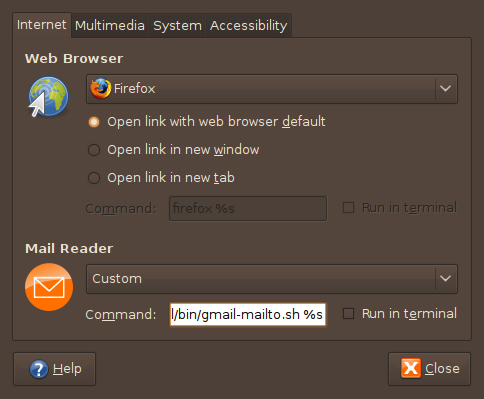
Now, we must tell Gnome to use this script as the default mail client. Simply open the Preferred Applications dialog in the System/Preferences menu. In the Mail Client section, select Custom and type the name of the script we just created in the Command field, followed by “%s”.
Preferred Applications window

Preferred Applications window

That’s it. It should be working now.

One last warning, tough. If you’re not logged in Google Apps, you will get the username/password dialog, and then you must click the e-mail address link again, in order to send a message.

Edit: you must verify if Firefox is running or not and start a new instance if it’s not. Changed the code accordingly.

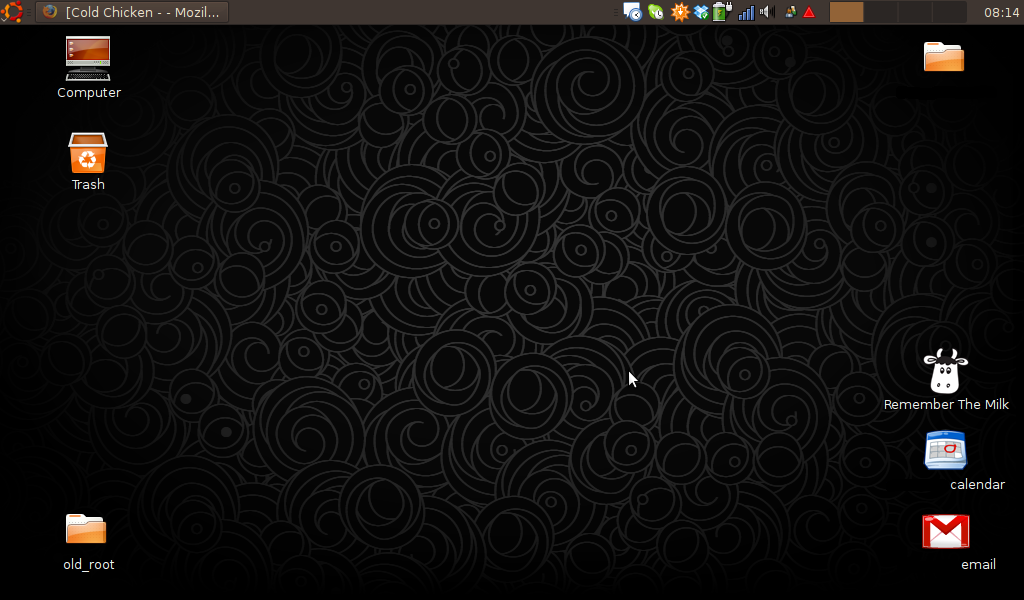
EeePC 901 desktop screenshot (#2)

Just for fun, a screenshot of Ubuntu Intrepid Ibex running on my EeePC 901.

Desktop screenshot thumbnail
(desktop-20090208.png, 329 KB)

Presidentes na passa [PT]

Hoje em dia as coisas já não são o que eram…

Presidentes na passa.

;-)

Desktop Meme

My Ubuntu desktop, on an Asus EEE PC 901:

Desktop Screenshot

Take a screenshot of your desktop right now, don’t change anything, post it on your blog.

Rage Against The Machine

After some tribulations, I’ll really be attending the Rage Against The Machine gig in Lisbon, at the Optimus Alive! Festival.

I was almost not going, but since I got hold of a couple of free tickets (thank you, Optimus), I’ll be there.

Eleven years later, in the exact same place where the Super Bock Super Rock Festival took place in the 4th of July 1997 (in the Passeio Marítimo de Algés), also with Rage Against The Machine.

Google Gears and Firefox 3

Seems like Google has finally updated their Gears Firefox extension to work with Firefox 3.

Nice.

Nokia - Get Out And Play

Lastest campaign by Nokia: Get Out And Play.

Looks like it was filmed in Lisbon…

reCAPTCHA Mailhide

«Tired of spam? reCAPTCHA Mailhide helps you protect your inbox by asking people to solve a reCAPTCHA before they can view your email address.»

A nice, simple, smart and useful tool from the guys at reCAPTCHA: reCAPTCHA Mailhide.

Test it here with my e-mail address: s@smux.net (click the dots before the @).

Fedora 9 goodness

Fedora 9 is looking awsome!

I’ve been trying it for a couple of weeks, and it’s getting better by the hour.

Two niceties:

  • Encrypted system volume with LUKS, at install time;
  • 3G connections (with my Vodafone 3G card) just works; it just really works; I just clicked “Auto GSM network connection” on NetworkManager and it worked; pure magic here, people.

I used Ubuntu for everything until now, but I’m seriously considering going back to Fedora.